


Opened 16 years ago
Closed 16 years ago
#1959 closed bug (fixed)
nVidia Corporation NV11 [GeForce2 Go]: drawing problems after new splash screen
| Reported by: | nielx | Owned by: | korli |
|---|---|---|---|
| Priority: | high | Milestone: | R1/alpha1 |
| Component: | Drivers/Graphics/nVidia | Version: | R1/pre-alpha1 |
| Keywords: | Cc: | ||
| Blocked By: | Blocking: | ||
| Platform: | All |
Description
After updating my machine to the latest subversion revision, the screen stops drawing correctly. The black boot screen (with logo) seems to be copied twice to the top of the screen. The main color of the desktop is black, and the fonts and borders are drawn. The windows suffer the same problems: it's all very black. When I drag a window to another location, it needs a few seconds to become visible again.
My resolution is 1024 x 768.
I'm sorry I cannot pinpoint to a more exact point in time, but it my previous checkout was from before the new boot screen with icons.
Attachments (2)
Change History (20)
comment:1 by , 16 years ago
| Cc: | added |
|---|
comment:2 by , 16 years ago
| Cc: | added |
|---|---|
| Milestone: | R1 → R1/alpha1 |
| Priority: | normal → high |
comment:4 by , 16 years ago
| Cc: | removed |
|---|---|
| Owner: | changed from to |
First a note: Please don't CC me. I am on the ticket mailing list and if you CC me, I will get all emails twice.
I also think it has nothing to do with the boot icons, but is rather a problem with the changed MTRR setup.
comment:5 by , 16 years ago
I would need additional information if it's possible : a syslog or serial log. Also, on Linux, you should find something about "BIOS-provided physical RAM map" in /var/log/messages, especially lines beginning with "BIOS-e820". Please provide on Linux the result of "cat /proc/mtrr". Thanks.
comment:6 by , 16 years ago
From the messages:
Jan 26 19:22:13 nielx-laptop kernel: [    0.000000] BIOS-provided physical RAM map:
Jan 26 19:22:13 nielx-laptop kernel: [    0.000000]  BIOS-e820: 0000000000000000 - 000000000009f000 (usable)
Jan 26 19:22:13 nielx-laptop kernel: [    0.000000]  BIOS-e820: 000000000009f000 - 00000000000a0000 (reserved)
Jan 26 19:22:13 nielx-laptop kernel: [    0.000000]  BIOS-e820: 00000000000dc000 - 0000000000100000 (reserved)
Jan 26 19:22:13 nielx-laptop kernel: [    0.000000]  BIOS-e820: 0000000000100000 - 000000001fef0000 (usable)
Jan 26 19:22:13 nielx-laptop kernel: [    0.000000]  BIOS-e820: 000000001fef0000 - 000000001feff000 (ACPI data)
Jan 26 19:22:13 nielx-laptop kernel: [    0.000000]  BIOS-e820: 000000001feff000 - 000000001ff00000 (ACPI NVS)
Jan 26 19:22:13 nielx-laptop kernel: [    0.000000]  BIOS-e820: 000000001ff00000 - 000000001ff80000 (usable)
Jan 26 19:22:13 nielx-laptop kernel: [    0.000000]  BIOS-e820: 000000001ff80000 - 0000000020000000 (reserved)
Jan 26 19:22:13 nielx-laptop kernel: [    0.000000]  BIOS-e820: 00000000ff800000 - 00000000ffc00000 (reserved)
Jan 26 19:22:13 nielx-laptop kernel: [    0.000000]  BIOS-e820: 00000000fff00000 - 0000000100000000 (reserved)
Jan 26 19:22:13 nielx-laptop kernel: [    0.000000] 0MB HIGHMEM available.
Jan 26 19:22:13 nielx-laptop kernel: [    0.000000] 511MB LOWMEM available.
Jan 26 19:22:13 nielx-laptop kernel: [    0.000000] Zone PFN ranges:
Jan 26 19:22:13 nielx-laptop kernel: [    0.000000]   DMA             0 ->     4096
Jan 26 19:22:13 nielx-laptop kernel: [    0.000000]   Normal       4096 ->   130944
Jan 26 19:22:13 nielx-laptop kernel: [    0.000000]   HighMem    130944 ->   130944
Jan 26 19:22:13 nielx-laptop kernel: [    0.000000] early_node_map[1] active PFN ranges
Jan 26 19:22:13 nielx-laptop kernel: [    0.000000]     0:        0 ->   130944
Jan 26 19:22:13 nielx-laptop kernel: [    0.000000] DMI 2.3 present.
MTRR dump:
reg00: base=0x00000000 (   0MB), size= 512MB: write-back, count=1
reg01: base=0x1ff80000 ( 511MB), size= 512KB: uncachable, count=1
reg02: base=0x1ff80000 ( 511MB), size= 512KB: uncachable, count=1
reg03: base=0xf0000000 (3840MB), size=  16MB: write-combining, count=1
I'll try to fetch a syslog.
comment:8 by , 16 years ago
geforce 4 mx (nforce2 integrated graphics)
I am having the same problem as nielx. Updating to revision 24695 does not resolve the drawing issues on my setup.
cat /proc/mtrr reg00: base=0x00000000 ( 0MB), size= 512MB: write-back, count=1 reg01: base=0x20000000 ( 512MB), size= 128MB: write-back, count=1 reg02: base=0x28000000 ( 640MB), size= 64MB: write-back, count=1 reg03: base=0x2c000000 ( 704MB), size= 32MB: write-back, count=1
and messages Mar 30 09:42:09 cgreen kernel: BIOS-provided physical RAM map: Mar 30 09:42:09 cgreen kernel: BIOS-e820: 0000000000000000 - 000000000009fc00 (usable) Mar 30 09:42:09 cgreen kernel: BIOS-e820: 000000000009fc00 - 00000000000a0000 (reserved) Mar 30 09:42:09 cgreen kernel: BIOS-e820: 00000000000e0000 - 0000000000100000 (reserved) Mar 30 09:42:09 cgreen kernel: BIOS-e820: 0000000000100000 - 000000002dfd0000 (usable) Mar 30 09:42:09 cgreen kernel: BIOS-e820: 000000002dfd0000 - 000000002dfdf000 (ACPI data) Mar 30 09:42:09 cgreen kernel: BIOS-e820: 000000002dfdf000 - 000000002e000000 (ACPI NVS) Mar 30 09:42:09 cgreen kernel: BIOS-e820: 00000000fec00000 - 00000000fec01000 (reserved) Mar 30 09:42:09 cgreen kernel: BIOS-e820: 00000000fee00000 - 00000000fee01000 (reserved) Mar 30 09:42:09 cgreen kernel: BIOS-e820: 00000000ff7c0000 - 0000000100000000 (reserved)
by , 16 years ago
comment:9 by , 16 years ago
comment:10 by , 16 years ago
| Cc: | added |
|---|
FWIW, I see the same problem with hrev24782 on a laptop that has a built-in Nvidia NV17M GeForce4 440 Go 64M video card.
The boot screen displays properly, but once the system boots, the colors are all screwed up. The deskbar, desktop, windows and window tabs backgrounds are all black; the window borders appear, but fonts are mostly garbled and in weird colors. The only thing that is displayed properly is the Haiku logo on the desktop background.
One picture is better than a thousand words, so a screenshot will follow.
follow-up: 12 comment:11 by , 16 years ago
One observation: the same hardware works fine when color depth is switched to 16 bits.
comment:12 by , 16 years ago
Replying to koki:
One observation: the same hardware works fine when color depth is switched to 16 bits.
Same here.
comment:13 by , 16 years ago
as of revision 24947 seems to resolve the drawing errors in the 32 bit colour space.
comment:15 by , 16 years ago
Just tried hrev25013 (clean install), and Haiku does in fact boot properly in 32 bit mode. Thanks!


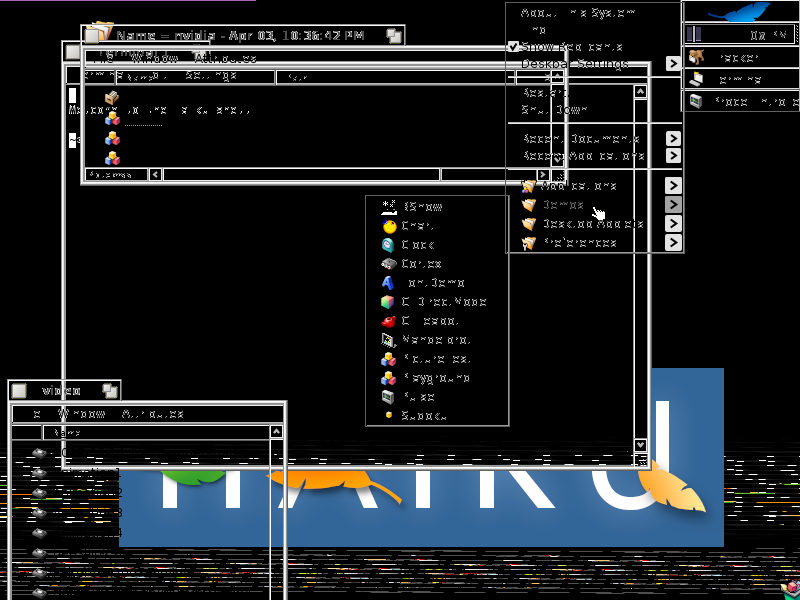
This is most probably the cause of Jerome's recent MTRR changes.