


#1747 closed bug (fixed)
Problematic Universalscroller install
| Reported by: | meanwhile | Owned by: | axeld |
|---|---|---|---|
| Priority: | normal | Milestone: | R1 |
| Component: | - General | Version: | R1/pre-alpha1 |
| Keywords: | Cc: | ||
| Blocked By: | Blocking: | ||
| Platform: | All |
Description
After doubleclicking UniversalScroller's install.sh file, Haiku gives errors. (clock ticks on, though)
Attachments (2)
Change History (9)
by , 16 years ago
| Attachment: | UScrash.txt added |
|---|
comment:1 by , 16 years ago
by , 16 years ago
| Attachment: | UScrash.png added |
|---|
comment:4 by , 16 years ago
When clicking 'Preferences' after installing, Haiku says: "Could not find the installed UniversalScroller (/boot/home/config/add-ons/input_server/filters/UniversalScroller)"
Maybe this means a Haiku version of UniversalScroller has to be made, I don't know...
follow-up: 6 comment:5 by , 16 years ago
It might be running into the same problem that SpicyKeys was, those directories add-on subdirs don't exist on the haiku image by default, so it might actually be failing to install its add-ons, in which case that error makes sense.
comment:6 by , 16 years ago
Note:
See TracTickets
for help on using tickets.


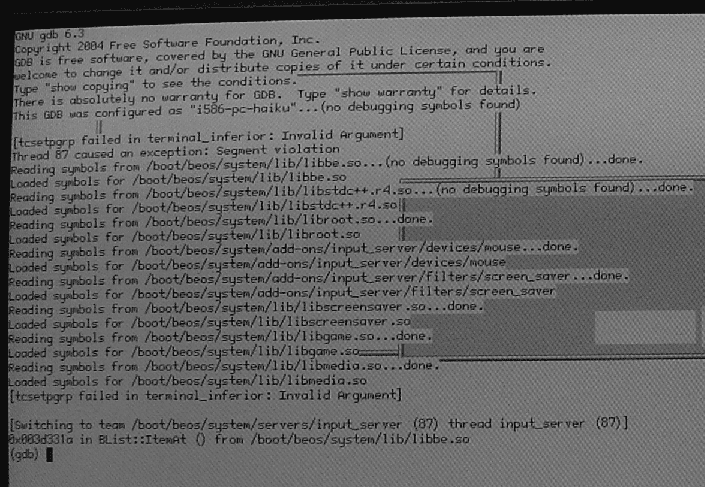
In UScrash.txt, look at the info after line #1879...everything before that is just info generated by Haiku booting (twice even)