


Opened 16 years ago
Closed 14 years ago
#3012 closed bug (fixed)
Terminal only draws up to the first non-ascii character on a line
| Reported by: | heto | Owned by: | jackburton |
|---|---|---|---|
| Priority: | normal | Milestone: | R1 |
| Component: | Applications/Terminal | Version: | R1/pre-alpha1 |
| Keywords: | Cc: | ||
| Blocked By: | Blocking: | ||
| Platform: | All |
Description
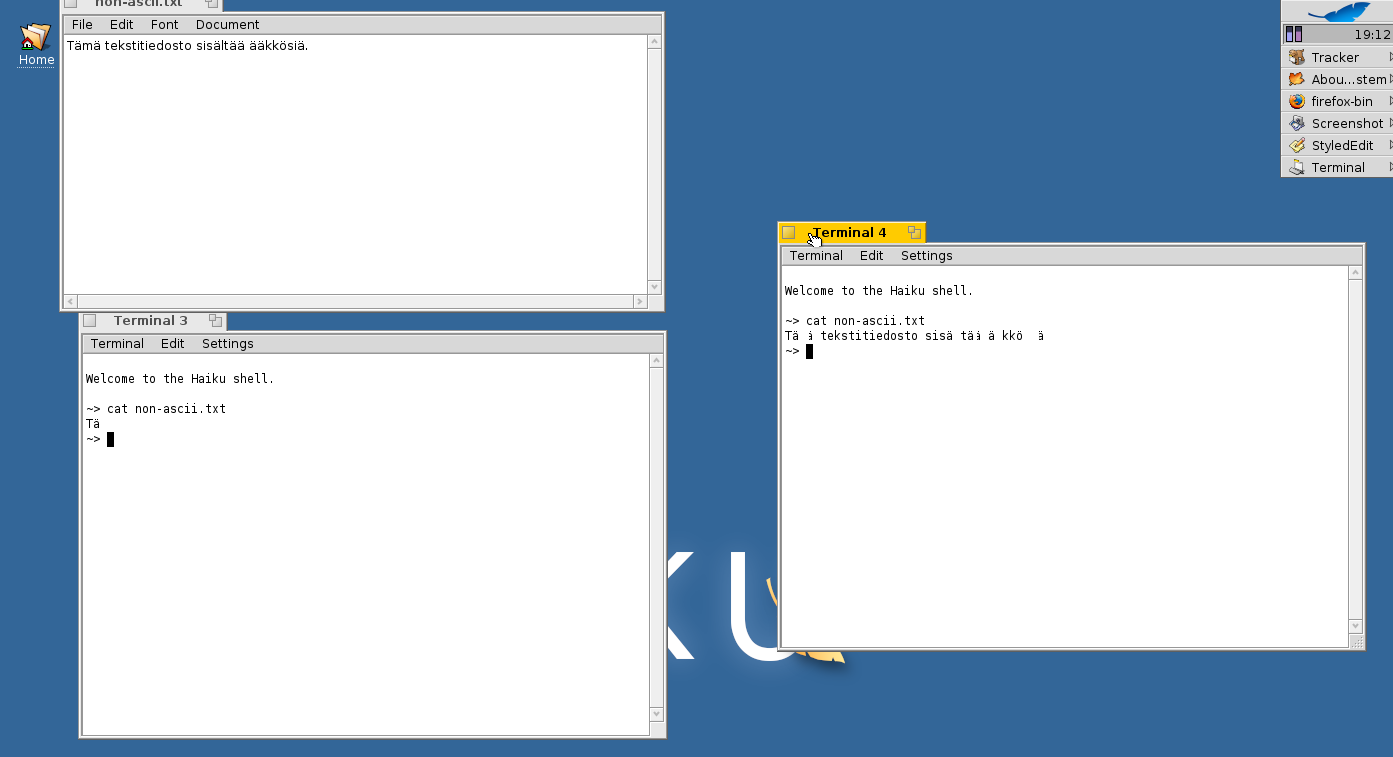
Terminal on hrev28387 draws each line only up to and including the first non-ascii character, such as ä; the rest of the line is left blank. The cursor advances as it should, and the character can be properly copied from the terminal and pasted in another app such as StyledEdit, so the characters seem to be correctly recorded.
The characters can also be revealed by forcing the terminal to draw horizontally sufficiently small pieces at once, for example by dragging the window off the left or right edge of the screen and then slowly dragging the window back on the screen.
The problem does not seem to be dependent on the character encoding. (I tried attaching to a screen session on a server by using screen -rU, detached from it, then changed the encoding from UTF-8 to ISO-8859-1 in the terminal menu and reattached using just screen -r; the terminal was drawn the same way both times.)
Steps to reproduce:
- Write something like the following in StyledEdit and save as non-ascii.txt:
Tämä tekstitiedosto sisältää ääkkösiä.
- Open Terminal and type cat non-ascii.txt
- You should see a line which seems to have only the letters Tä on it; you can try horizontally covering and revealing the window with the StyledEdit window and copy-pasting the text back to StyledEdit.
I'll attach a screenshot, also available at http://www.students.tut.fi/~vettenrh/dump/haiku_terminal_nonascii.png, that should demonstrate the issue. The same command has been run in both Terminal 3 and Terminal 4, but while the Terminal 3 window has not been covered after the output, I have dragged the Terminal 4 window out of the right edge of the screen and slowly back.
Attachments (4)
Change History (13)
by , 16 years ago
| Attachment: | haiku_terminal_nonascii.png added |
|---|
comment:1 by , 16 years ago
| Blocked By: | 1855 added |
|---|
Unless I'm mistaken, this is related to the missing glibc widechar support...linking that ticket just in case, though Stefano should be able to say for certain.
comment:2 by , 16 years ago
| Component: | Applications/Terminal → System/libroot.so |
|---|---|
| Owner: | changed from to |
comment:3 by , 16 years ago
| Blocked By: | 1855 removed |
|---|---|
| Component: | System/libroot.so → Applications/Terminal |
| Owner: | changed from to |
AFAIK Terminal doesn't use wide chars and I also don't think cat does. So this sounds more like a Terminal issue.
comment:4 by , 15 years ago
static int32 UTF8Char::ByteCount(char firstChar) in UTF8Char.h reported wrong byteCounts for my german special chars, so i looked up UTF8 in wikipedia and did this implementation which does make cat or less a file with special characters look right.
static int32 ByteCount(char firstChar) {
if ((uchar)firstChar < 128) return 1; else if ((uchar)firstChar >= 128 + 64 + 32 + 16) return 4; else if ((uchar)firstChar >= 128 + 64 + 32) return 3; else if ((uchar)firstChar >= 128 + 64) return 2; else
return 0; No valid UTF-8 Byte?
}
Now it seems to be the application that supports utf8 or not.
by , 15 years ago
| Attachment: | diff-headers-folder.diff added |
|---|
fixes multibyte char usage with ls (at least)
by , 15 years ago
| Attachment: | diff-src-folder.diff added |
|---|
fixes multibyte char usage with ls (at least) and fixes bytecount issue in Terminal App
comment:5 by , 15 years ago
The previous version of the UTF8Char.h in Terminal looks just fine to me. It's equivalent to your version, only that it tests for the more common cases (?) first. I am right now trying the rest of your patch, but since I am no expert on POSIX and the bin tools, I am not feeling confident I can oversee possibly bad side effects.
comment:6 by , 15 years ago
Sorry, my mistake. UTF8Char.h is indeed broken. I don't see why, but with your patch, ls indeed doesn't stop after the first multi-byte char. The problem is the cast to uint32 instead of uchar.
by , 15 years ago
| Attachment: | UTF8Char.h.diff added |
|---|
This should be the correct way to check the bytecount since it checks the complete length-bitsequence
comment:7 by , 15 years ago
| Resolution: | → fixed |
|---|---|
| Status: | new → closed |
This has been fixed, thanks for the investigation!
comment:8 by , 15 years ago
| Resolution: | fixed |
|---|---|
| Status: | closed → reopened |
No, this hasn't been fixed at all. So far, only the bug in UTF8Char.h in Terminal has been fixed. When the rest of the patches is applied, Terminal can at least list UTF8 file names. But I don't know what else the stdlib.h change may do to command line programs. This should be investigated by someone more firm with POSIX issues.
comment:9 by , 14 years ago
| Resolution: | → fixed |
|---|---|
| Status: | reopened → closed |
This was obviously fixed some time ago



a screenshot demonstrating the problem and the workaround of dragging the window off-screen