


Opened 15 years ago
Closed 13 years ago
#3274 closed enhancement (fixed)
ScreenSaver: Improve presentation of disabled options because of missing DPMS support. (easy)
| Reported by: | HAL | Owned by: | axeld |
|---|---|---|---|
| Priority: | low | Milestone: | R1 |
| Component: | Preferences/ScreenSaver | Version: | R1/pre-alpha1 |
| Keywords: | Cc: | ||
| Blocked By: | Blocking: | #3275 | |
| Platform: | All |
Description
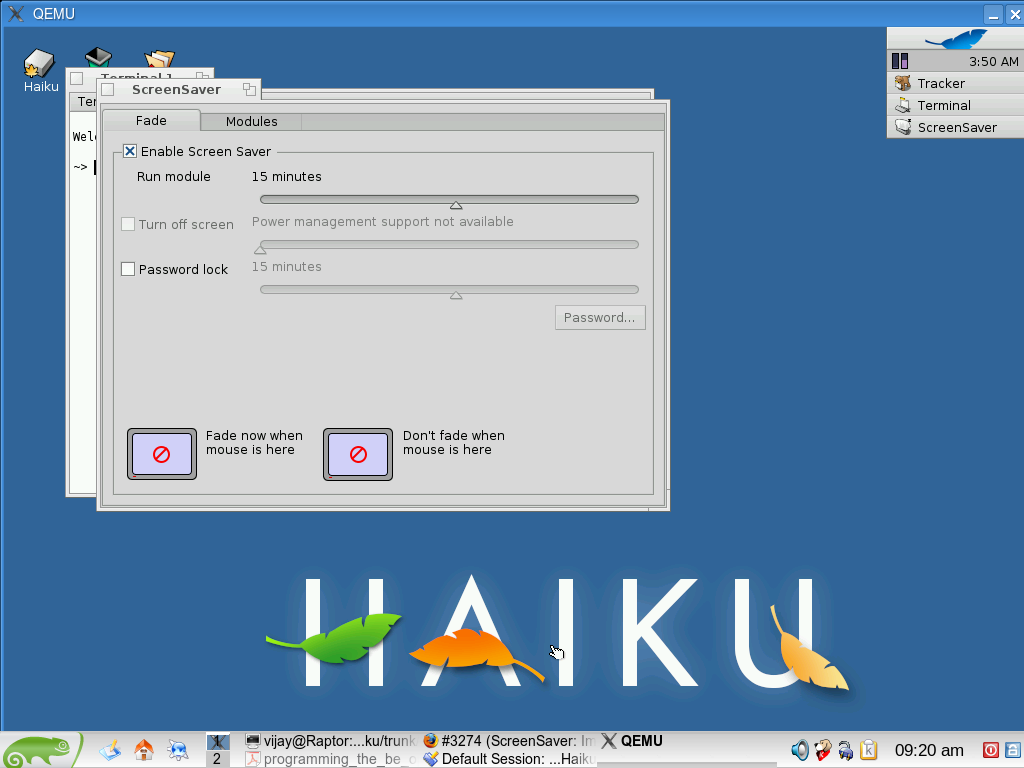
If I open ScreenSaver and try to select a time for putting monitor into low power, there is no selection available "Turn off screen" is greyed out. I am using hrev28846 vmware image.
Attachments (2)
Change History (23)
by , 15 years ago
comment:1 by , 15 years ago
I accidentally duplicated this bug; something wrong with Firefox when I tried to upload attachment first time. It did not indicate that I had done so. I could not get any change on page by clicking again to upload. I clicked the back button on the browser for previous page where I was entering the bug and then with the Add attachment radio button selected, clicked the button to confirm and then add the attachment in second try. This time it did indicate on web page that it was uploaded but the bug was also duplicated. Please delete #3375.
comment:2 by , 15 years ago
| Resolution: | → invalid |
|---|---|
| Status: | new → closed |
The low power screen option cannot work in VESA mode.
comment:3 by , 15 years ago
| Blocking: | 3275 added |
|---|
comment:4 by , 15 years ago
| Priority: | normal → low |
|---|---|
| Resolution: | invalid |
| Status: | closed → reopened |
| Summary: | Unable to select "Turn off screen" in ScreenSaver preferences. → ScreenSaver: Improve presentation of disabled options because of missing DPMS support. |
| Type: | bug → enhancement |
We could however improve the GUI in the ScreenSaver preflet to make it obvious why the option is not available.
comment:5 by , 15 years ago
| Summary: | ScreenSaver: Improve presentation of disabled options because of missing DPMS support. → ScreenSaver: Improve presentation of disabled options because of missing DPMS support. (easy) |
|---|
comment:6 by , 15 years ago
Newbie developer here.Ryan suggested this ticket to me.Need some clarification on how the presentation can be improved?One way would be ,Instead of greying out the option we can enable the option, but when the user checks it we can have a dialog saying that the "DPMS support is unavailable".Any suggestions?
comment:7 by , 15 years ago
First of all, you need to find a way to check the DPMS support. You can probably do this by using BScreen::DPMSCapabilities(). Then you need to disable the checkbox and slider for turning off the screen in case there is no support, but additionally, you need to add a BStringView below these controls explaining that DPMS is not available in the current graphics driver.
comment:8 by , 15 years ago
Before submitting the patch.Check the attached screenshot guys.Does this look ok?
follow-up: 13 comment:9 by , 15 years ago
You could remove the code that changes the slider bar width, so that the default width is used. Then you have a little more room perhaps. I would place the string view so that it aligns with the left side of the checkbox already. In Appearance, where there happens something similar with the subpixel anti-aliasing option, I have made the text use the italic font face. Those are the only (minor) suggestions I could give, otherwise it looks just fine! :-) Thanks for working on it!
follow-up: 11 comment:10 by , 15 years ago
I think that the sentence used is too technical. "DPMS" and "VGA Driver" shouldn't be used, IMHO. "Support unavailable", or "Power Management support not available" or something like this would sound better.
comment:11 by , 15 years ago
Replying to jackburton:
I think that the sentence used is too technical. "DPMS" and "VGA Driver" shouldn't be used, IMHO. "Support unavailable", or "Power Management support not available" or something like this would sound better.
I agree, the sentence is a bit technical.I think i will go with "Power management support not available".
follow-up: 14 comment:12 by , 15 years ago
I think the placement of the message should be closer to where the user action takes place.
Ergo, IMO it is much more logical to place a "Power management not supported" text bit following (to the right) of the "Turn off screen" checkbox label (where "20 minutes" is), perhaps between parenthesis. And since the feature is not supported, the "20 minutes" text should not be displayed at all.
This would also allow you to even out the vertical space between sliders (it looks weird now).
FWIW and IMHO.
comment:13 by , 15 years ago
Replying to stippi:
You could remove the code that changes the slider bar width, so that the default width is used. Then you have a little more room perhaps. I would place the string view so that it aligns with the left side of the checkbox already. In Appearance, where there happens something similar with the subpixel anti-aliasing option, I have made the text use the italic font face. Those are the only (minor) suggestions I could give, otherwise it looks just fine! :-) Thanks for working on it!
Thanks for the suggestions.Had a look at Appearence, greying out the string looks neat.I will do that here.
comment:14 by , 15 years ago
Replying to koki:
I think the placement of the message should be closer to where the user action takes place.
Ergo, IMO it is much more logical to place a "Power management not supported" text bit following (to the right) of the "Turn off screen" checkbox label (where "20 minutes" is), perhaps between parenthesis. And since the feature is not supported, the "20 minutes" text should not be displayed at all.
This would also allow you to even out the vertical space between sliders (it looks weird now).
FWIW and IMHO.
I agree it will look definitely good if text is placed where "20 minutes" is.
comment:15 by , 15 years ago
The below code snippet is taken from _UpdateTurnOffScreen() from ScreenSaverWindow.cpp
bool enabled = (fSettings.TimeFlags() & ENABLE_DPMS_MASK) != 0;
BScreen screen(this); uint32 dpmsCapabilities = screen.DPMSCapabilites(); fTurnOffScreenFlags = 0; if (dpmsCapabilities & B_DPMS_OFF)
fTurnOffScreenFlags |= ENABLE_DPMS_OFF;
if (dpmsCapabilities & B_DPMS_STAND_BY)
fTurnOffScreenFlags |= ENABLE_DPMS_STAND_BY;
if (dpmsCapabilities & B_DPMS_SUSPEND)
fTurnOffScreenFlags |= ENABLE_DPMS_SUSPEND;
fTurnOffCheckBox->SetValue(enabled && fTurnOffScreenFlags != 0
? B_CONTROL_ON : B_CONTROL_OFF);
i could not understand what fSettings.TimeFlags() returns and also i believe ENABLE_DPMS_MASK bits are not set in value returned by fSettings.TimeFlags().On what basis the ENABLE_DPMS_MASK bits will be set?
by , 15 years ago
| Attachment: | screensaver.png added |
|---|
comment:16 by , 15 years ago
Check the latest screenshot.I could not get the text of TurnOff checkbox"Turn off screen" and the "Power management" text are not aligned(Horizontal) properly.italic font face
comment:17 by , 15 years ago
Check the latest screenshot.I could not get the text of TurnOff checkbox"Turn off screen" and the "Power management" text are not aligned(Horizontal) properly.Is it possible to use italic font face in slider label??
follow-up: 19 comment:18 by , 15 years ago
On second thought, why display the "Turn off screen" checkbox and slider at all when power management is not supported? Why not just hide them in that case?
comment:19 by , 15 years ago
Replying to koki:
On second thought, why display the "Turn off screen" checkbox and slider at all when power management is not supported? Why not just hide them in that case?
I would prefer to follow an approach which is used uniformly in apps across haiku for this kind of situations(where an apps feature depends on a driver).Putting the text below/above/removing controls all sounds good to me.But is there any standard way to do these things since this is the first time iam doing UI programming.If graying out unsupported features is used across apps then i believe it is more apt than removing controls.
comment:20 by , 15 years ago
Well. The feature should still be visible. So greying out the "Turn off screen" check box, but removing the slider and replacing it with an explanation of why it's disabled could be an option. However, I am against simply hiding features completely, since that may just irritate users and may introduce problems with user guides and other information, which the seemingly does not apply anymore.
comment:21 by , 13 years ago
| Resolution: | → fixed |
|---|---|
| Status: | reopened → closed |
Added in hrev40530 a text explaining why the Turn Off feature is not available, which hide the slider then.


Shows graphics device