


Opened 11 years ago
Closed 9 years ago
#9392 closed bug (no change required)
SCSI_OP_REQUEST_SENSE
| Reported by: | Morbid | Owned by: | marcusoverhagen |
|---|---|---|---|
| Priority: | normal | Milestone: | R1 |
| Component: | Drivers/Disk | Version: | R1/alpha4.1 |
| Keywords: | Cc: | Jens.Arm@… | |
| Blocked By: | Blocking: | ||
| Platform: | x86 |
Description
PC is setup in plain SATA and AHCI. Harddrive Samsung SSD 830 256GiB. KDL after 4th Icon on Startup: Panic AHCI: SCSI_OP_REQUEST_SENSE not yet supported. (No Log available)
Attachments (5)
Change History (20)
comment:1 by , 11 years ago
| Component: | Drivers → Drivers/Disk |
|---|---|
| Owner: | changed from to |
comment:2 by , 11 years ago
| Cc: | added |
|---|
comment:3 by , 11 years ago
comment:4 by , 11 years ago
Need to type it manually. Checked it two times and hopefully no writing errors. Motherboard is a BIOSTAR GF8100 M2+ TE with AMD Athlon 64 x2 and 4GiB RAM. DVD-ROM is from LG. No Problems under Windows7 and VectorLinux.
by , 11 years ago
| Attachment: | KDL_on_Screen_manually.txt added |
|---|
by , 11 years ago
| Attachment: | Linux_HD_Info.txt added |
|---|
comment:6 by , 11 years ago
Usually only for CD/DVD-ROMs. Unfortunately the stack trace didn't help, as it's only from a helper thread -- don't you own a camera for this? I feel guilty having wasted some time from you now :-)
comment:7 by , 11 years ago
Haiku is not wasting, it's my future OS!!! I've a Camera but the result was very bad! Will remove the DVD-Drive from the SATA and try to boot via USB! We'll see what's going to happen!
comment:8 by , 11 years ago
Ok! Thanks for the Tip! After i remove SATA from the DVD-ROM it boots up without problems. What going to happen with the DVD-Drive. Is it defect? The drive works fine with Windows/Linux!
comment:9 by , 11 years ago
Interesting. Apparently, the AHCI driver is not recognizing the drive as CD-ROM, but the upper layers are, not sure how this is possible, but it's definitely an interesting issue :-)
What drive/model is the DVD-ROM?
comment:10 by , 11 years ago
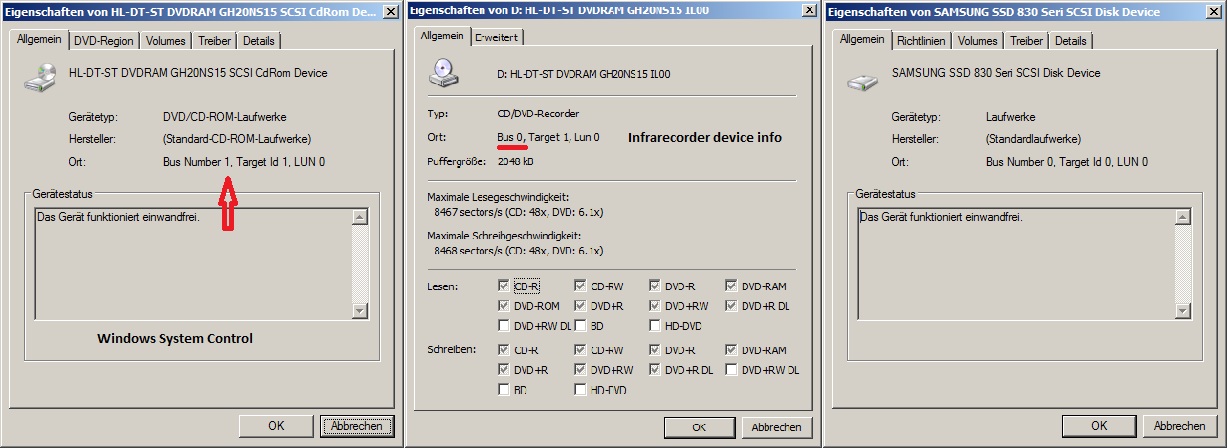
It is from LG manufactured in June 2008. Super Multi DVD-Rewriter Model: GH20 NS15 ROM Ver.: IL00 S/N: 806LATT164633
supports SecurDisc
by , 11 years ago
| Attachment: | Infrarecorder_Dev_Info.jpg added |
|---|
by , 11 years ago
| Attachment: | WindowsSystemInfos.jpg added |
|---|
comment:12 by , 11 years ago
Characteristics at boot: (Boot up Haiku via Hama USB 2.0 Card Reader 35 in 1 with SD 2Gib) At 4th Icon the LED of CD/DVD-Writer is blinking and after init it stops blinking, try to switch back to Card-Reader and the LED of the Reader permanently glow. After a few seconds the KDL apears as written above. Sorry, didn't detect it before.
comment:13 by , 11 years ago
Trying to boot via Card-Reader with latest hrev45222 (anyboot) with the same characteristics as above. Trying to boot with Haiku-Live-CD hrev45222 (anyboot) leads me to another KDL see below. (again manually) THE BELOW KDL MUST BE ANOTHER PROBLEM!!! hrev25226 boot up with USB-Stick -> Same characteristics as above. On removing SATA from CD/DVD-Writer, Haiku boot without any errors.
by , 11 years ago
| Attachment: | Boot_with_Haiku_LIVE_CD.txt added |
|---|
comment:14 by , 9 years ago
Looks like defective Graphic-Card destroys on Board-Chip of the Mainboard. Chip heats up and error occures. Sometimes under Windows the time/date-settings changes after wake up of suspend mode. Also system halt on restart at bootscreen. Graphic-Card and Mainboard are scrapped. Ticket could be closed. Thx
comment:15 by , 9 years ago
| Resolution: | → no change required |
|---|---|
| Status: | new → closed |



Can you please attach a back trace of the panic? I'm interested in why this happens; the command is not usually issued for hard drives.
I have a Samsung SSD 830 128 GiB here that works just fine, btw.